Free automated appraisal · Beta

Free domain appraisal with a retail range—not just a number.

Start with an automated retail estimate and plausible range for your domain name, then inspect the available evidence and limitations. The public Beta includes a one-time allowance of 5 free appraisals without sign-in. The anonymous allowance does not reset. Free accounts include 3 lifetime appraisals and can save private candidates and notes. After available free allowances are exhausted, further appraisals require an active paid or complimentary plan.

One-time 5 free appraisals without sign-in; the allowance does not reset. Free accounts include 3 lifetime appraisals and can save private candidates and notes. After available free allowances are exhausted, further appraisals require an active paid or complimentary plan.

Inspect the output field guide — not a live appraisal
No sign-in to startUp to 5 domains per batchRanges and limitations visible

Partial recorded result · October 25, 2026

A recorded appraisal excerpt, with its limitations

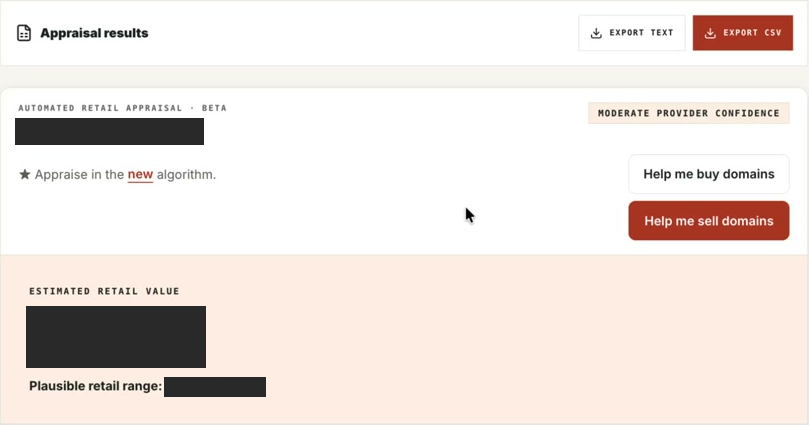
These are authentic historical cropped screenshots from an October 25, 2026 recording, with the candidate and estimated value/range redacted. This is not a complete or live report.

Estimates—not guaranteed sale prices. There is no guarantee of sale or accuracy. Screenshot controls are not interactive; the interface and available evidence may differ today.

Historical partial appraisal interface with the candidate, estimated value and range hidden by opaque redactions.
Partial appraisal view from the recording, not a reconstructed example or a complete evidence report. The legacy export and buy/sell controls shown are image pixels, not available actions here. Open the appraisal crop at full resolution.
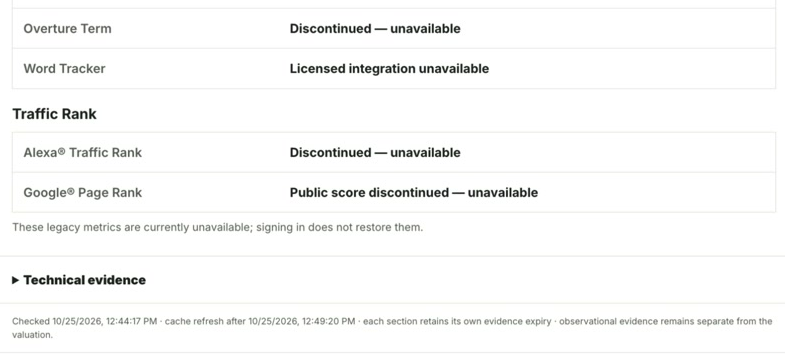
Historical unavailable-evidence warnings and original checked, cache and expiry timestamps, with valuation-separation guidance.
Original unavailable and freshness warnings from the same recording. The checked, cache and expiry timestamps are historical observations, not current provider status. Signing in does not restore discontinued metrics. Open the limitations crop at full resolution.

Three ways to inspect the output

The partial genuine excerpt above shows historical interface evidence. The field glossary explains terms, not a live appraisal. The educational video explains how to read a range, evidence, and missing data; it is not proof of accuracy or a completed customer report. None starts an appraisal or is required before you run your own.

Educational walkthrough: How to Read a Domain Appraisal: Range, Evidence & Missing Data | SparkNamer

Inspect the output, field by field

What to inspect in an appraisal result

Output guide—not a completed appraisal. No live appraisal was run for this example

example.com — reserved example input only, not a candidate to acquire or a customer domain.

Editorial field guide checked against the current public response schema and server projection on October 18, 2026. This is not a provider response, customer case study, saved appraisal, or accuracy benchmark. Expand each field to inspect what to read in your own result; no value, confidence, source observation, or sale has been invented.

estimatedRetailValueNot run — no estimate supplied
What the field means
The headline automated retail estimate is model output, not a buyer offer, acquisition quote, or business valuation.
What to verify next
Read it with the range, currency, appraisal time, methodology, and limitations. Never substitute another tool's larger number for evidence.
likelyRetailRangeNot run — no range or currency supplied
What the field means
Low and high describe a plausible retail range, not guaranteed minimum proceeds or an immediate wholesale price.
What to verify next
Compare only like-for-like value definitions. Verify asking price, renewal cost, fees, and actual buyer interest separately.
confidenceNot run — no score or label supplied
What the field means
The provider confidence score and its label communicate model uncertainty. They are not an independently measured probability of a sale.
What to verify next
Read the limitations and evidence gaps before relying on the label; a confident model output is not verified demand.
appraisedAt / sourceNot run — no appraisal timestamp or runtime provenance
What the field means
In a completed response, appraisedAt dates the estimate and source identifies provider-runtime-estimate and retention rules. That timestamp is not the date of every supporting observation.
What to verify next
Inspect checked and expiry times on each evidence slice. Keep an older observed sale date separate from a newly checked source.
comparableCategoriesNot run — no market-category ranges supplied
What the field means
These ranges are model market-category context, not completed-sale records. They do not prove a particular domain sold.
What to verify next
Do not cite category examples as verified comparables. Inspect separately returned sale records and their material differences.
research.optionalEnrichment.comparableSalesNot run — no lookup or sale records supplied
What the field means
Actual optional lookup states distinguish not requested, unavailable, not_found, and observed. None is a valuation of zero; no rows from a bounded source does not prove no historical sale exists.
What to verify next
For observed rows inspect domain, reported amount, currency, sale date, venue, source class, checked time, expiry, and limitations. Judge relevance yourself; rows do not establish that the headline estimate was calculated from them.
marketplaceListingNot run — no listing or availability observation
What the field means
A detected marketplace signal or asking price is not a completed sale. Missing listing evidence is not proof that a domain is available.
What to verify next
Verify the current seller, final marketplace destination, quote type, currency, and acquisition route independently. Do not pay based on an appraisal alone.
research / limitationsNot run — no registration, web, search, or legal checks completed
What the field means
Available research is separate from the estimate. Optional coverage and failed checks must stay visible; missing search data is not zero demand and a web observation is not trademark clearance.
What to verify next
Inspect source dates and unresolved states. Independently check registration, current and historical use, material conflicts, and any decision-critical gaps.

To inspect real values, run your own appraisal with remaining access. This guide does not consume an allowance or start a lookup.

Run your own Beta appraisal
01

How to start your free domain appraisal

Choose Run Free Appraisal to open the public workspace. Enter a registrable domain such as example.com, without a protocol, page path, or subdomain. For a small batch, enter one per line, up to 5 unique domains and no more than your remaining free allowance.

Submit the list to start the appraisal. Each domain is processed separately, so a successful result and an unavailable result can appear in the same batch. Review the status of each row rather than treating the batch as one verified conclusion.

02

What the free result includes—and what it does not

A successful Beta result shows an automated retail estimate, a plausible range, confidence, and visible limitations. Available domain research can add lexical characteristics, registration or web-state observations, and source links with observation times. Coverage varies; an unavailable check is not a negative finding.

Optional research evidence is not guaranteed for every appraisal. Comparable-sale rows and search data depend on configured sources, permitted coverage, and availability; when returned, inspect them in the result. Do not assume that a completed appraisal contains every check or a complete acquisition investigation. Inspect the evidence states shown in the actual result; estimates and market-category context are not verified completed sales.

  • Estimate and range, not a guaranteed sale price
  • Confidence describes uncertainty, not a chance of selling
  • Observed evidence stays separate from inferred value
  • Missing, unavailable, and optional checks stay explicit
03

Five free appraisals is a one-time allowance

The public Beta includes a one-time allowance of 5 free appraisals without sign-in. The anonymous allowance does not reset. Free accounts include 3 lifetime appraisals and can save private candidates and notes. After available free allowances are exhausted, further appraisals require an active paid or complimentary plan.

The 5-domain batch size is an input ceiling, not a fresh allowance for every submission. The workspace checks remaining access before starting. A refresh or another browser does not establish a new free allowance; an exhausted visitor is asked to sign in before continuing.

An unavailable appraisal is not a completed result. Keep its error state visible and retry only when access and the service are available. Continued authenticated use has its own access rules; this free offer does not promise every optional research check.

04

Continue in a free account without losing your research

Open the public workspace with Run Free Appraisal. To keep a candidate and private notes, use an available Save search action and complete its sign-in or create-account step. Generic account creation does not itself confirm a saved candidate: check for the save confirmation in your private research. You return to the workspace; buying a subscription is not required just to keep private research metadata. This does not preserve the full appraisal report.

Free accounts include 3 lifetime appraisals under a separate account allowance, including existing unpaid accounts with unused credits. This is not a new batch allowance or a daily refill, and you do not need to prove that you personally used all five guest appraisals first. Check the workspace's remaining account credits before starting another appraisal. Signing in, returning later, or changing plans does not refill an allowance.

Private saved research remains available after appraisal credits are used. Saving or reopening a saved candidate does not start a new appraisal. If you request another appraisal after your available free credits are exhausted, an active paid or complimentary plan is required. Saving a candidate is not a completed acquisition investigation, and signing in does not restore unavailable source evidence or make an estimate more certain.
  • Guest appraisal access: five one-time completed appraisals without sign-in; a five-domain batch is only an input ceiling.
  • Account appraisal access: three lifetime credits on the account, not three per visit or per saved candidate.
  • Private continuity: keep candidates and notes in the free account; distinguish reopening saved research from requesting new provider work.
  • Next step after exhaustion: keep reviewing saved metadata, or inspect current plans if you need more appraisals. No purchase is required to read this guide.
05

After the first result: finish your task or keep a candidate

If this was a one-off check, use the range, available evidence, and gaps to choose your next verification; you do not need a subscription merely because the result was useful. If the candidate remains worth researching, save the candidate and private notes through the existing save action, not the full report. Reopening saved metadata is different from requesting fresh research.

If you regularly screen or price names, check the remaining allowance before the next appraisal and review current plans when you need continued use. Paid plans provide continued appraisal capacity, not a more accurate version of the same estimate or a promise that every optional source will return data. A failed evidence check needs an explanation or recovery, not a claim that payment supplies the missing truth.

Follow the input-to-decision appraisal processCompare tools against the task you actually repeat
06

Read retail value in the right context

A retail estimate describes a possible end-user sale context. It is not a wholesale or liquidation quote, the amount a registrar will charge, or an offer from a buyer. A quick investor-to-investor sale and a patient retail sale answer different questions; do not average them into a single asking price.

For an owned domain, compare the range with relevant reported sales, likely uses, and your actual holding costs before setting a price. For a prospective purchase, verify the seller, acquisition route, and current asking price separately. None of those practical facts follows from the appraisal number.

Record purchase, renewal, and unknown costs in the acquisition-cost worksheetRevisit an owned domain's thesis before its next renewal
07

A domain name is not an operating website

This tool appraises the domain name, not the revenue, profit, customer accounts, content, or other assets of an operating website. A domain-only estimate cannot value the whole business or establish its traffic quality.

The Beta is also not an appraisal certificate or an independent accuracy benchmark. Unusual brands, sparse comparable coverage, and one-buyer strategic value can make automated estimates less informative. If the decision needs a formal opinion, use an appropriately qualified specialist rather than presenting this output as one.

08

What to verify after the estimate

Record the domain, appraisal date, stated value type, range, and limitations together. Then verify the decision-critical gaps: close reported sales, current registration and use, acquisition costs, material conflicts, and any unresolved checks.

Use the Beta appraisal estimate for initial screening and its available evidence for the next questions—not as a recommendation to buy. Free accounts include 3 lifetime appraisals and can save private candidates and notes. After available free allowances are exhausted, further appraisals require an active paid or complimentary plan.

Related domain research

Questions

Frequently asked questions

Does SparkNamer offer a free automated appraisal?

Yes. The public Beta includes a one-time allowance of 5 free appraisals without sign-in. The anonymous allowance does not reset. Free accounts include 3 lifetime appraisals and can save private candidates and notes. After available free allowances are exhausted, further appraisals require an active paid or complimentary plan. The workspace accepts up to 5 domains per batch, subject to remaining access.

Do I have to buy a plan to save my research?

No. A free account can save private candidates and notes, and includes 3 lifetime appraisals under its separate account allowance. The allowance does not reset on sign-in or return visits. Saved research metadata remains available after credits are used; further appraisals then require active paid or complimentary access. Signing in does not restore unavailable evidence.

Does the free appraisal allowance reset every day?

No. The anonymous allowance is one-time, not daily or per batch. After five completed free appraisals, sign in to continue under the applicable access rules.

Is a free domain appraisal a guaranteed selling price?

No. It is an automated retail estimate and cannot guarantee that a buyer exists or will pay the displayed amount. It is not a wholesale bid or acquisition price.

Does this appraisal value my website's revenue?

No. It estimates the domain name, not an operating website's revenue, profit, customer base, content, or other business assets.

Are comparable sales and every research check included free?

No. Every research check is not guaranteed. Optional comparable-sale and search evidence may be observed, unavailable, or not requested depending on configured coverage. Available observations, missing checks, and estimates are separate; market-category ranges must not be read as completed-sale records.

Start with one real candidate

Review a domain you own or may acquire.

Run an Automated Retail Appraisal — Beta without signing in. Review the rounded range, provider confidence, market-category context, and visible limitations.

Run Free Appraisal